NEWSLETTER: July 2026
Skylims Flags & Alerts - How can I prevent release of incorrect results?
Edition 8 5-minute read
A topic on every lab manager's mind: In the fast-paced environment we work in, how can technology support my lab to run at optimal efficiency? With accelerated growth and staff constantly working at maximum capacity, how can I ensure the results that are sent out remain reliable and correct, without compromising TAT? What can my LIMS do to help me prevent accidental release of incorrect results?
If these questions resonate, this newsletter is for you.
Skylims Flags & Alerts: Checkpoints at every step
Skylims boasts a versatile and customisable checkpoint mechanism that can trigger at every phase of the requisition life cycle – from request capture up to reporting and even invoicing. When an entry does not match a business rule, Skylims will generate a flag or alert that will require a person to investigate and take action.
These flags will typically prevent the requisition from progressing through its life cycle until cleared; like prevent a test result from being released or routed until it was investigated or prevent a requisition from being finalised. Clearing a flag often requires a comment entry which files directly to the requisition's event audit trail.
Certain dictionary configurations will trigger flags, including:
- Delta flags when comparing with previous results to the current result,
- Hold flags or impossible result alerts based on test reference ranges, or
- Repeat period flags based on the test repeat days period.
There are also various flags and alerts that the system will generate that doesn't require any setup. Skylims has built-in system rules that will automatically perform checks to ensure the requisition moves smoothly through its phases. When it encounters an exception, like a printer offline and unable to print the report, or a missing billing code in a price list, Skylims will flag these events automatically.
Examples of system checkpoints, their related flags and typical roles associated to take action:
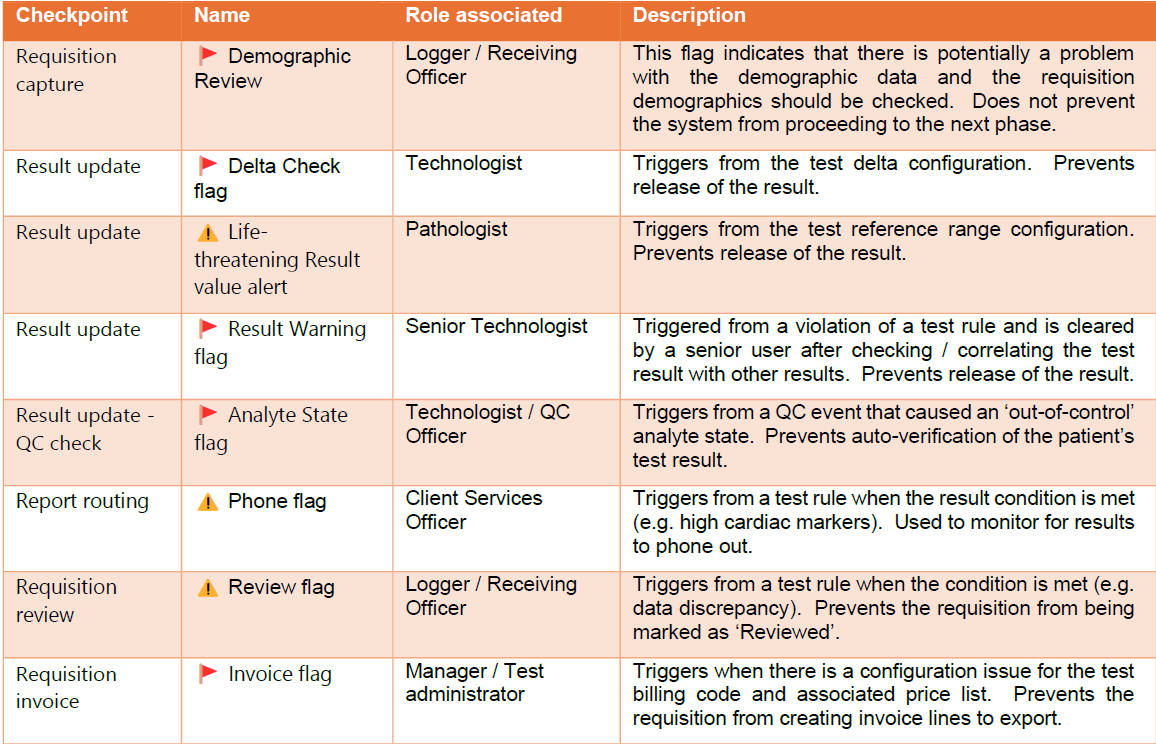
The requisition life cycle and checkpoints for flags or alerts
Flags and alerts trigger points can happen at every step of the requisition life cycle, with the flexibility of either preventing the requisition from progressing to the next stage or simply an action to be completed during that phase. The below diagram shows you just how versatile (and powerful) this mechanism is:
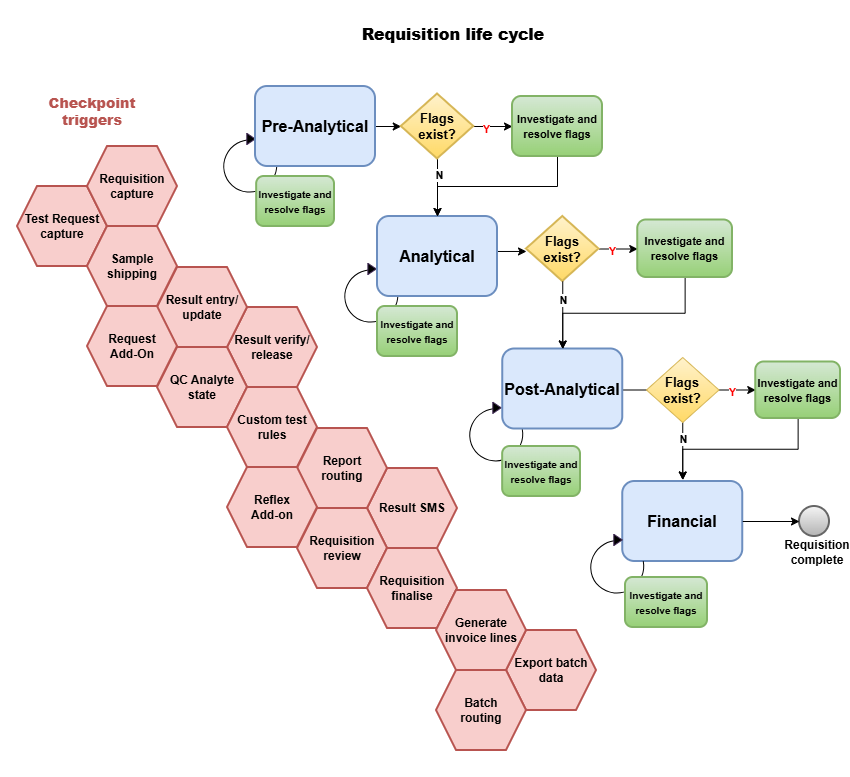
When a specific requirement arises, custom rule sets can be built to trigger custom flags based on almost any field captured against the requisition. The trigger point, flag type, business rule and user permissions can be configured to dictate exactly where to halt the process. This gives you the power to control your workflow from start to finish. Our next newsletter edition will cover these steps in more detail.
| Coming up Next: | Need help with your Skylims configuration? |
|---|---|
| Now that we have spilled the beans on Skylims Flags and Alerts, the next question turns towards practical implementation - "How do I configure custom flags, and how do I manage them?" Our next newsletter will provide a simple, step-by-step guideline on exactly this. |
Contact the Mukon team for expert assistance according to your custom requirements. Email: support@mukon.co.za Tel: 012 450 0240 |
We hope you enjoyed this newsletter!
Warm regards,
The Mukon Team